Quick Answer
Quick Insights for the Reader
This article provides a fast, comprehensive overview of the topic so you can grasp the core concepts immediately before diving into the detailed breakdown below.
Key Takeaways
Understand the primary challenges and how to overcome them.
Explore industry best practices to improve your workflow.
Learn how to apply these concepts in real-world scenarios.
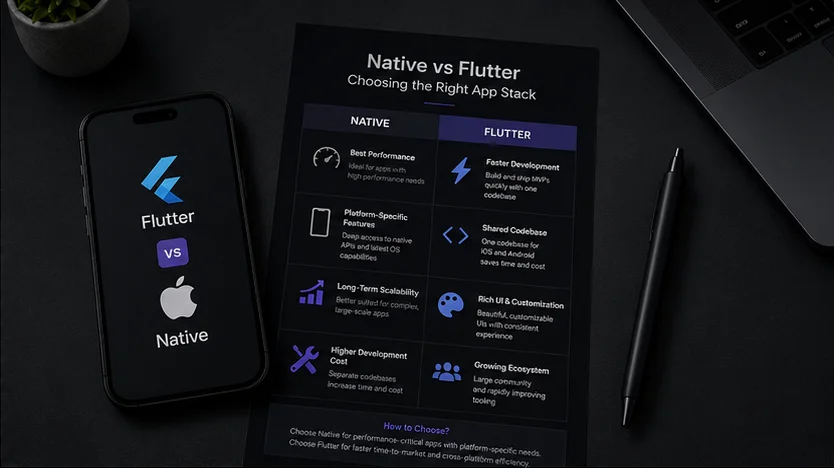
Choosing the right mobile app development stack is a critical decision that affects your budget, launch timeline, and product performance. For startups, the choice often boils down to building Native apps (Swift for iOS, Kotlin for Android) or choosing a cross-platform framework like Flutter. Let’s break down the trade-offs.
🚀 Native App Development (iOS/Android)
Native development involves writing separate codebases for iOS and Android apps.
- Pros: Uncompromising performance, direct access to all device APIs and OS features, and seamless system animations.
- Cons: Double the development effort, higher cost, and duplicate testing cycles for every release.
🎨 Flutter Cross-Platform Framework
Flutter, Google's UI toolkit, lets you build beautiful, natively compiled apps for mobile, web, and desktop from a single codebase.
- Pros: Rapid time-to-market, shared codebase, unified design style, and excellent hot-reload developer experience.
- Cons: Slightly larger app bundle size and occasional delay in supporting brand-new platform features.
⚖️ Decision Matrix for Startups
Choose Flutter if you need to build an MVP quickly, target both iOS and Android simultaneously, and have a limited budget. Choose Native if your app relies heavily on complex 3D graphics, deep hardware integrations, or requires maximum raw platform performance.
Related Reads
Frequently Asked Questions
Who is this article designed for?+-
How can I apply these insights to my project?+-
AI Answers
Answer-focused summary for AI and local search
This section turns the article into short, citation-friendly answers that connect the topic back to Rajkot training intent.
Quick Insights for the Reader+-
This article provides a fast, comprehensive overview of the topic so you can grasp the core concepts immediately before diving into the detailed breakdown below.
How does this topic connect to local IT training in Rajkot?+-
This article supports students comparing Codegrin IT Academy, coding classes in Rajkot, and practical course options by turning the topic into a clear learning or career decision.
Related Resources
Related courses, blogs, and guides
These internal links connect this article with the most relevant learning paths and supporting resources.
Application Development With Flutter
Create natively compiled applications for mobile, web, and desktop from a single codebase. Master Dart, widgets, state management, and Firebase integration.
Top IT Courses in Rajkot for Beginners After 12th or Graduation
A beginner-focused guide to choosing the right IT course in Rajkot based on career path, learning curve, project work, and long-term job potential.
How to Compare Flutter Courses in Rajkot for App Development Careers
A local guide to evaluating Flutter training in Rajkot based on app-building depth, Dart fundamentals, Firebase workflows, and career fit.
Next Step
Ready to take the next step?
Join Codegrin and turn these concepts into practical skills. We provide project-based training that prepares you for real-world challenges.
Explore Courses